The Examples
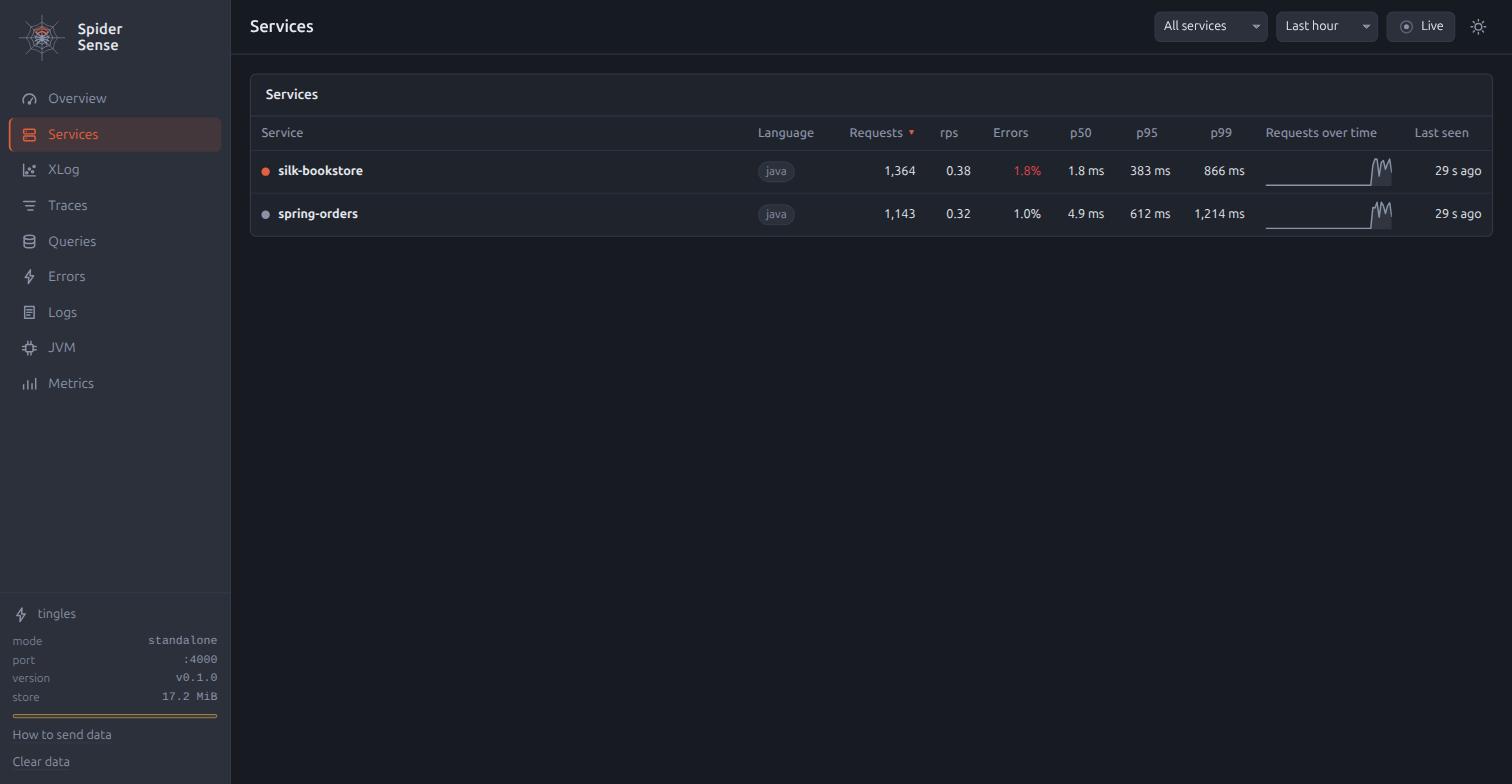
The repository carries four deliberately misbehaving applications and a load generator, so there is something to look at before there is anything of your own. All of them send to whichever Spider Sense they are pointed at, and each one does something wrong on purpose. Three are web applications on three different stacks, and the fourth has no web server at all.
The applications
- spring-orders
-
A Spring Boot 4.1 application with Spring Data JPA and H2 over an orders and customers domain, on port 8082. It has a slow report endpoint whose JPQL runs over a large table, a lazy-loading N+1 page, a checkout that fails with a business exception, and a flaky endpoint that fails 20% of the time. One endpoint calls
silk-bookstoreover HTTP, so a trace spans two services. Spring Boot Actuator is on, and its Micrometer meters, fromhttp.server.requestsand the HikariCP pool to Spring Data repository invocations, Tomcat sessions and Logback events, reach Spider Sense through the agent’s Micrometer bridge, so the metrics explorer shows about ninety metrics for this one service. The bridge is off in the OpenTelemetry agent by default;-Dotel.instrumentation.micrometer.enabled=trueturns it on, andbootRunand the demo scripts pass it. - servlet-warehouse
-
A Jakarta Servlet application on embedded Tomcat 11, with plain JDBC over Tomcat’s own pool and H2, on port 8083. There is no framework between the servlets and the agent, so it shows what a classic Servlet stack looks like: endpoints are named after servlet mappings, so every item page is
GET /items/*, a filter runs inside the server span, and the exception behind a 500 is what Tomcat’s error page received. It has a full-scan search, an N+1 item page, a slow report, a flaky endpoint, and an async servlet whose span lasts until the request completes on another thread, or times out into a 503. - batch-worker
-
A plain Java program with HikariCP, Logback and H2 that runs scheduled jobs and serves no HTTP at all. It exists for the questions the web applications cannot raise: a service with zero requests that still has a JVM, logs and jobs, and the findings the other three never produce. A reconciliation job scans 300,000 unindexed rows, which is a slow query inside a job, and a report job streams every row into memory, which is a slow job. A reminder job catches a gateway failure and logs it at
ERROR, so the span is fine and only the log knows, which is alog-error. An archive job holds a connection while it sleeps through a slow upload, eight tasks over a pool of three, so the pool runs dry, the last tasks fail on the connection timeout, and the job is slow as well. Every reminder starts a thread that waits for an acknowledgement that never comes, so the thread count climbs until a cap. - silk-bookstore
-
A Spider Silk application with jte pages and a JSON API, over spring-jdbc and an H2 file database, on port 8081. About 200,000 rows are seeded, so an unindexed
LIKE '%…%'search is a real slow query. AnSLEEPalias makes one query slow by decree, one page runs N+1 queries, one endpoint throws, and one endpoint sleeps without running any SQL. - load-gen
-
A plain Java program that hits the three web applications at a randomised rate, so the dashboards fill without manual clicking. It is instrumented too, through
java.net.http, so some traces start at the client. The worker needs no traffic; its jobs run on their own.
Each of the five lives under examples/ in the repository, with a README that lists every route or job and says why it is wrong.
The demo without installing anything
spider-sense.benelog.net/demo is the same UI over a recording of the demo below: the four applications under one Spider Sense for five minutes, every page answered from files, no server behind it. Everything that reads works, from the map to a single trace’s profile, and the range, the marks and the compare page cover the recorded window. Anything that writes, such as a mark or an acknowledgement, answers that the page is a recording.
scripts/demo-site.sh makes it: it runs scripts/demo-shared.sh for MINUTES (five by default), marks before and after along the way, captures every answer the UI asks for into demo/data/, stops the demo, and assembles build/demo-site/, which any static file server can serve.
The captured files are committed, so the manual’s build assembles the page from them without running Java.
The two scripts
Both scripts build what they need, start everything, print where each thing is, and stop it all on Ctrl-C.
Pass --no-build to skip the Gradle build when nothing has changed.
Every process writes its log to build/demo-logs/, and RPS sets the load generator’s rate, which defaults to 4 requests per second.
scripts/demo-shared.sh      # one standalone Spider Sense that all four applications forward to
scripts/demo.sh             # each application with its own embedded Spider Sense
demo-shared.sh
scripts/demo-shared.sh is one standalone Spider Sense on port 4000, which the four applications and the load generator forward to with -Dspidersense.collector=.
SENSE_PORT moves it.
This is where a trace crossing two services shows up in one place, where the map has every service on it, and where one findings call covers all of them.
The applications keep their own ports: 8081, 8082 and 8083, and the worker has none.
The load generator runs under the agent here as well, named load-gen, so its calls are the root of the traces they start.
demo.sh
scripts/demo.sh is agent mode four times over, with no extra process.
Each application starts from its own installDist script or boot jar with the agent on the command line and hosts its own Spider Sense, so there are four UIs and four pictures.
The load generator runs without the agent here.
| Application | Application port | Spider Sense |
|---|---|---|
silk-bookstore |
8081 |
|
spring-orders |
8082 |
|
servlet-warehouse |
8083 |
|
batch-worker |
none |
The four share the one H2 file under ~/db/spider-sense/, so java -jar "$SENSE" findings on the default port answers for every service, and --url=http://127.0.0.1:4003 asks one of the others instead.
After the applications stop
The data is in an H2 file under ~/db/spider-sense/, which outlives every process that wrote to it.
java -jar spider-sense.jar opens the same screens on the same rows once the demo has been stopped.
What to do with them
The examples are the shortest way to see each page with real data on it, and they are also the fixture the agent loop is described against.
Start scripts/demo-shared.sh, let the load generator run for a minute, and then read the findings:
java -jar "$SENSE" findings --since=15mEach finding points back at one of the faults above, so Findings can be read against code that is known to be wrong.
The web applications produce n-plus-one, slow-query, slow-endpoint, slow-external and error; the worker adds slow-job, log-error, pool-exhausted and thread-growth, and it is the one service on which check has nothing to judge, because a job is never a request.
The Loop walks the whole cycle on them.
Handing the demo to an agent
The repository carries the skill at skills/spider-sense/, so an AI coding agent started in the checkout needs no init step.
This prompt runs the loop end to end in Claude Code, or in any agent with a shell:
Read skills/spider-sense/SKILL.md, then start the demo with `scripts/demo-shared.sh --no-build`
in the background and wait until it prints the URLs. Run `mark demo`, let the load generator
run for two minutes, then run `findings --since=demo`. For each of the top three findings open
one of its traces and tell me which line under examples/ causes it. Do not fix anything.
The agent answers with the findings as the tool printed them, a trace id for each as evidence, and the file and line each fault comes from, because the finding carries the code location and the README beside each example says what is wrong on purpose.
A second prompt of "fix the N+1 in spring-orders and show me before and after" has it fix, restart the application, exercise the same endpoints, and run compare --before=demo --after=… (Marks and Compare).
In a project of your own, java -jar spider-sense.jar init installs the same skill and writes the jar’s path into CLAUDE.md, and Quick Start for Agents lists the prompts that work from there.